Outcome
You can create one useful company record, connect people and deals, understand domain learning, and remove a firm without erasing history.
Navigation path
CRM > Contacts > Companies
Access
Free CRM with no time limit: 100 stored contacts and 10 active opportunities for your company, plus companies, pipelines, manual tasks and notes, CSV import, and Email Scripts. Paid plans add automations, reports, automated matching, calendar integration, domain connections, and email sending.
On this page
Before you start
Data, sources, and access to prepare
- CRM access
- The company name and its relationship to your team
Use companies as relationship rollups
A company is not a mailing list
Linking people to a company helps organization and future corporate-domain filing. It does not establish marketing consent for those people.
Company name Required
Firm name shown across CRM
- Format
- Plain text
- Units
- Not applicable
- Save behavior
- Stored when Add creates the company or Save company completes an edit.
- Downstream effect
- Labels the company in contact relationships, filters, and rollups.
Company type Recommended
Principal, Brokerage, Lender, Tenant, Investor, or Other
- Format
- One supported company-type option
- Units
- Not applicable
- Save behavior
- Stored when Save company completes the company-detail edit.
- Downstream effect
- Clarifies the firm role without changing record access.
Owner Calculated
Displayed teammate responsible for the company relationship
- Format
- Not applicable
- Units
- Not applicable
- Save behavior
- No direct entry in the company form. CREBuilder automatically assigns the creating user as owner when the company is created.
- Downstream effect
- Identifies relationship responsibility; role and ownership policy still control management actions.
Corporate domain Calculated
Learned nonconsumer email domain associated with the firm
- Format
- Not applicable
- Units
- Not applicable
- Save behavior
- No direct entry. The value updates automatically from saved linked contacts with a qualifying nonconsumer email domain.
- Downstream effect
- Can file future new corporate captures into the company without granting outreach consent.
People and deal rollups Calculated
Linked contact count, open-deal count, and value
- Format
- Not applicable
- Units
- Not applicable
- Save behavior
- No direct entry. Rollups recalculate automatically from saved company links and permitted open Deal records and values.
- Downstream effect
- Summarizes the visible company relationship and transaction context.
Company name
- Requirement
- Required
- What it means
- Firm name shown across CRM
- Format
- Plain text
- Units
- Not applicable
- Save behavior
- Stored when Add creates the company or Save company completes an edit.
- Downstream effect
- Labels the company in contact relationships, filters, and rollups.
Company type
- Requirement
- Recommended
- What it means
- Principal, Brokerage, Lender, Tenant, Investor, or Other
- Format
- One supported company-type option
- Units
- Not applicable
- Save behavior
- Stored when Save company completes the company-detail edit.
- Downstream effect
- Clarifies the firm role without changing record access.
Owner
- Requirement
- Calculated
- What it means
- Displayed teammate responsible for the company relationship
- Format
- Not applicable
- Units
- Not applicable
- Save behavior
- No direct entry in the company form. CREBuilder automatically assigns the creating user as owner when the company is created.
- Downstream effect
- Identifies relationship responsibility; role and ownership policy still control management actions.
Corporate domain
- Requirement
- Calculated
- What it means
- Learned nonconsumer email domain associated with the firm
- Format
- Not applicable
- Units
- Not applicable
- Save behavior
- No direct entry. The value updates automatically from saved linked contacts with a qualifying nonconsumer email domain.
- Downstream effect
- Can file future new corporate captures into the company without granting outreach consent.
People and deal rollups
- Requirement
- Calculated
- What it means
- Linked contact count, open-deal count, and value
- Format
- Not applicable
- Units
- Not applicable
- Save behavior
- No direct entry. Rollups recalculate automatically from saved company links and permitted open Deal records and values.
- Downstream effect
- Summarizes the visible company relationship and transaction context.
Required means the field is needed to complete or support this workflow. Some screens allow a draft to save before every required item is complete. The steps and troubleshooting call out controls the product actively blocks.
Create a company and connect people
- 1
Search first
CRM > Contacts > Companies
Search the legal or commonly used company name.
Expected result: You know whether the firm is already in Companies.
If this step does not work
Try a shortened name before creating another company. If uncertain, inspect contact affiliations.
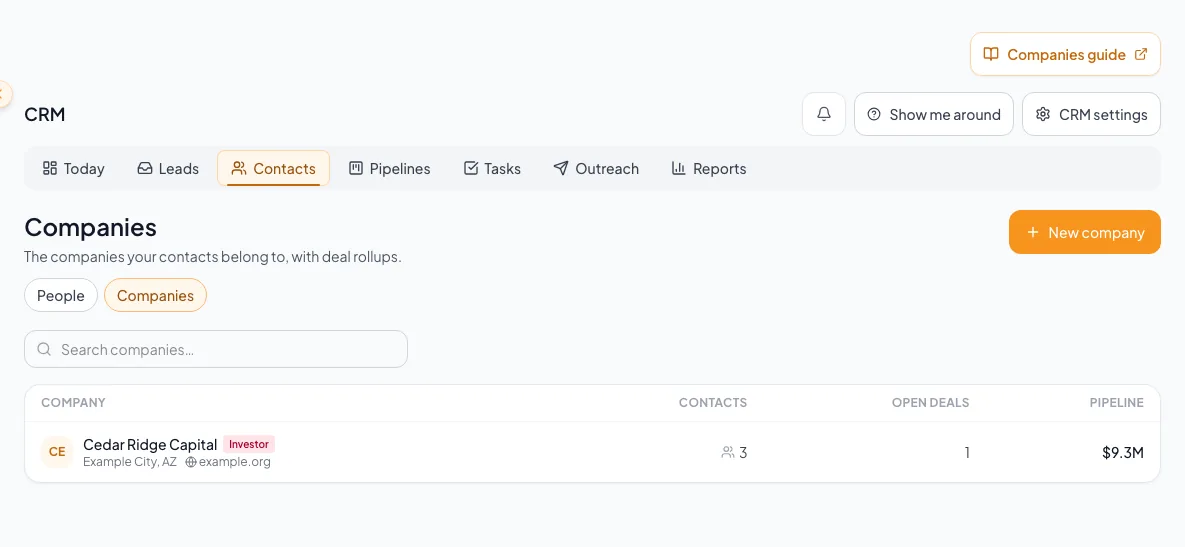
Create or match the company once, connect the appropriate contacts, and maintain shared organization information. - 2
Open company creation
Companies > New company
Select New company.
Expected result: The Company name input appears.
If this step does not work
Cancel if the firm is already in Companies.
- 3
Enter the company name
Companies > New company > Company name
Enter the company name.
Expected result: The name is ready for creation.
If this step does not work
Preserve the entered name if a later save attempt fails.
- 4
Save the company
Companies > New company > Add
Select Add.
Expected result: The new or existing company detail workspace opens.
If this step does not work
If creation fails, the entered name remains available for a safe retry.
- 5
Open company editing
Company detail > Edit company
Select Edit company.
Expected result: The Company details tab opens with supported fields.
If this step does not work
Ask the company owner or an Admin if Edit company is unavailable.
- 6
Choose the company type
Company detail > Edit company > Company type
Select the firm’s supported relationship type.
Expected result: The editor reflects the company’s role.
If this step does not work
Use Other only when the supported types do not fit.
- 7
Save company details
Company detail > Edit company > Save company
Select Save company.
Expected result: The saved company details and type are visible.
If this step does not work
Keep the editor open with the draft intact if a save error appears.
- 8
Open the company contact picker
Company detail > Contacts > Add contact
Select Add contact.
Expected result: The existing-contact search picker opens.
If this step does not work
Create a missing person through the separate contact workflow before linking them here.
- 9
Choose a company contact
Company detail > Contacts > Add contact > Search contacts
Enter the existing person’s name in Search contacts.
Expected result: The picker shows matching contacts.
If this step does not work
If the person belongs to a different firm, verify the change before proceeding.
- 10
Add the existing contact to the company
Company detail > Contacts > Add contact > search result
Select the intended existing person in the results.
Expected result: The person appears under the company and their contact workspace shows the firm.
If this step does not work
Preserve important prior affiliation context in a note if useful.
- 11
Verify deal relationships
Company detail > Deals
Review deals where the firm is primary or appears as an additional party.
Expected result: Open deal counts and values reflect the linked opportunities.
If this step does not work
If a deal is missing, update the deal party relationship rather than creating a duplicate deal.
Understand corporate-domain learning
How a corporate domain helps future filing
Linking an appropriate corporate address can teach CRM where future new captures from that domain belong.
Contact linked to company
Eligible corporate domain learned
Future new captured contact
Auto-filed to company
- Contact linked to companyEligible corporate domain learnedlearn
- Eligible corporate domain learnedFuture new captured contactcompare
- Future new captured contactAuto-filed to companymatch
Boundaries
- Consumer domains should not identify a company.
- Domain learning helps classify future new captures, not rewrite every existing contact.
- A matching domain is organizational evidence, not proof of identity or consent.
- Review auto-filed contacts when two firms share infrastructure or a holding-company domain.
Remove a company only after checking consequences
- 1
Review relationships
Company detail
Inspect people, open deals, additional deal parties, activity, owner, and rollups.
Expected result: You understand what will remain after company removal.
If this step does not work
Reassign active responsibility before deleting the company record.
- 2
Review the company-removal warning
Company detail > Delete company confirmation
Read the irreversible confirmation for the exact firm.
Expected result: You understand which current relationships and historical records will remain.
If this step does not work
Cancel the dialog if the named firm or consequences are not correct.
- 3
Confirm company removal
Company-removal confirmation > Delete company
Select Delete company.
Expected result: The firm is archived/removed, contacts detach, and historical company names and deal history remain.
If this step does not work
There is no normal UI restore. If removed in error, stop and contact support with the company identity.
You can see but cannot manage the company
Likely cause: Company management is limited by ownership and role.
- Check the displayed owner.
- Ask the owner or an Admin to make the change or transfer the company.
- Do not duplicate the firm.
Rollups do not include an expected deal
Likely cause: The deal is not linked to the company as its contact firm or an additional party.
- Open the deal.
- Review contact and party relationships.
- Add the correct party rather than altering value totals manually.
A future capture filed to the wrong company
Likely cause: The learned corporate domain is shared or ambiguous.
- Move the contact to the correct company.
- Document the shared-domain issue.
- Review subsequent captures from that domain.
Final verification
- The intended company has the correct saved name, details, linked contacts, and deal context.
- If you intentionally removed a company, its contacts are detached and retained historical company names and deal history remain understandable.
- Companies you still need remain available. Reviewing company details does not require removing the company.
A CRM that already knows your listings
Track buyers, tenants and deals right next to the OMs, listings and Deal Rooms you build in CREBuilder. Free to start.
No credit card required.