Outcome
Your Land document presents parcel and development facts, Price/Acre, and maps, with no rent-roll or cash-flow pages.
Navigation path
Create New > Land > Document wizard
Access
Document creation access
On this page
Before you start
Data, sources, and access to prepare
- Acreage and parcel identifiers
- Zoning and entitlement source information
- Asking price when marketed for sale
Use parcel-first content
Suggested Land property data
Zoning Recommended
Current zoning classification.
- Format
- Plain-text jurisdictional classification with source date when useful
- Units
- Not applicable
- Save behavior
- Property Data autosaves two seconds after the value stops changing.
- Downstream effect
- Displays current zoning context in the Land property-data presentation.
Lot Size (Acres) Required
Site area used by Price/Acre.
- Format
- Positive numeric value
- Units
- Acres
- Save behavior
- Property Data autosaves two seconds after the value stops changing.
- Downstream effect
- Supplies the acreage denominator for Price/Acre and the site-area fact in Land output.
Topography Optional
Relevant terrain characteristics.
- Format
- Concise plain text
- Units
- Not applicable
- Save behavior
- Property Data autosaves two seconds after the value stops changing.
- Downstream effect
- Adds terrain context to the Land property-data table.
Utilities Optional
Utility availability or service.
- Format
- Plain text naming each service and status
- Units
- Not applicable
- Save behavior
- Property Data autosaves two seconds after the value stops changing.
- Downstream effect
- Adds sourced utility availability to Land property facts without changing valuation.
Entitlements Optional
Approved or pending development rights with clear status.
- Format
- Plain text including approved or pending status
- Units
- Not applicable
- Save behavior
- Property Data autosaves two seconds after the value stops changing.
- Downstream effect
- Displays development-rights context while preserving its status.
Flood Zone, Soil Conditions, Environmental Optional
Site-risk context.
- Format
- Plain text with the relevant source or report date
- Units
- Not applicable
- Save behavior
- Property Data autosaves two seconds after the value stops changing.
- Downstream effect
- Adds sourced risk context to Land property facts without representing independent due diligence.
Frontage and Access Recommended
Road exposure and legal or physical access.
- Format
- Numeric frontage plus concise legal or physical access description
- Units
- Feet or the source unit
- Save behavior
- Property Data autosaves two seconds after the value stops changing.
- Downstream effect
- Adds road exposure and access context to the Land presentation.
Zoning
- Requirement
- Recommended
- What it means
- Current zoning classification.
- Format
- Plain-text jurisdictional classification with source date when useful
- Units
- Not applicable
- Save behavior
- Property Data autosaves two seconds after the value stops changing.
- Downstream effect
- Displays current zoning context in the Land property-data presentation.
Lot Size (Acres)
- Requirement
- Required
- What it means
- Site area used by Price/Acre.
- Format
- Positive numeric value
- Units
- Acres
- Save behavior
- Property Data autosaves two seconds after the value stops changing.
- Downstream effect
- Supplies the acreage denominator for Price/Acre and the site-area fact in Land output.
Topography
- Requirement
- Optional
- What it means
- Relevant terrain characteristics.
- Format
- Concise plain text
- Units
- Not applicable
- Save behavior
- Property Data autosaves two seconds after the value stops changing.
- Downstream effect
- Adds terrain context to the Land property-data table.
Utilities
- Requirement
- Optional
- What it means
- Utility availability or service.
- Format
- Plain text naming each service and status
- Units
- Not applicable
- Save behavior
- Property Data autosaves two seconds after the value stops changing.
- Downstream effect
- Adds sourced utility availability to Land property facts without changing valuation.
Entitlements
- Requirement
- Optional
- What it means
- Approved or pending development rights with clear status.
- Format
- Plain text including approved or pending status
- Units
- Not applicable
- Save behavior
- Property Data autosaves two seconds after the value stops changing.
- Downstream effect
- Displays development-rights context while preserving its status.
Flood Zone, Soil Conditions, Environmental
- Requirement
- Optional
- What it means
- Site-risk context.
- Format
- Plain text with the relevant source or report date
- Units
- Not applicable
- Save behavior
- Property Data autosaves two seconds after the value stops changing.
- Downstream effect
- Adds sourced risk context to Land property facts without representing independent due diligence.
Frontage and Access
- Requirement
- Recommended
- What it means
- Road exposure and legal or physical access.
- Format
- Numeric frontage plus concise legal or physical access description
- Units
- Feet or the source unit
- Save behavior
- Property Data autosaves two seconds after the value stops changing.
- Downstream effect
- Adds road exposure and access context to the Land presentation.
Required means the field is needed to complete or support this workflow. Some screens allow a draft to save before every required item is complete. The steps and troubleshooting call out controls the product actively blocks.
Understand Land workflow exceptions
| Feature | Land behavior |
|---|---|
| Occupancy | Not calculated |
| Primary metric | Price/Acre |
| Secondary metric | Price/SF |
| Financial Scope | Hidden in standard Land documents |
| Rent Roll | Hidden |
| Income & Expenses | Hidden |
| Valuation | Hidden except BOV keeps valuation |
| Tenant Profiles | Hidden |
| Rental Comparables | Hidden |
Changing to Land preserves but hides financial records
The conversion warning explains that existing financial data is preserved but does not appear in the standard Land document. Inspect the final page list after conversion.
Complete the Land workflow
Land steps
- 1
Select Land
Create New, Select Property Type
Choose Land.
Expected result: Parcel terminology and Land step exclusions are applied.
If this step does not work
Change the property type in Property Details if the asset has recurring tenant economics instead.
- 2
Verify site identity
Property Details
Enter the address, asking price, acreage-related base facts, and available parcel identity.
Expected result: The subject site is identified correctly.
If this step does not work
Correct geocoding or address before building maps.
- 3
Add development facts
Property Data
Use the Land suggestions to add zoning, acres, topography, utilities, entitlements, risks, frontage, and access.
Expected result: Only verified, material rows appear.
If this step does not work
Delete empty suggestions and qualify pending entitlements accurately.
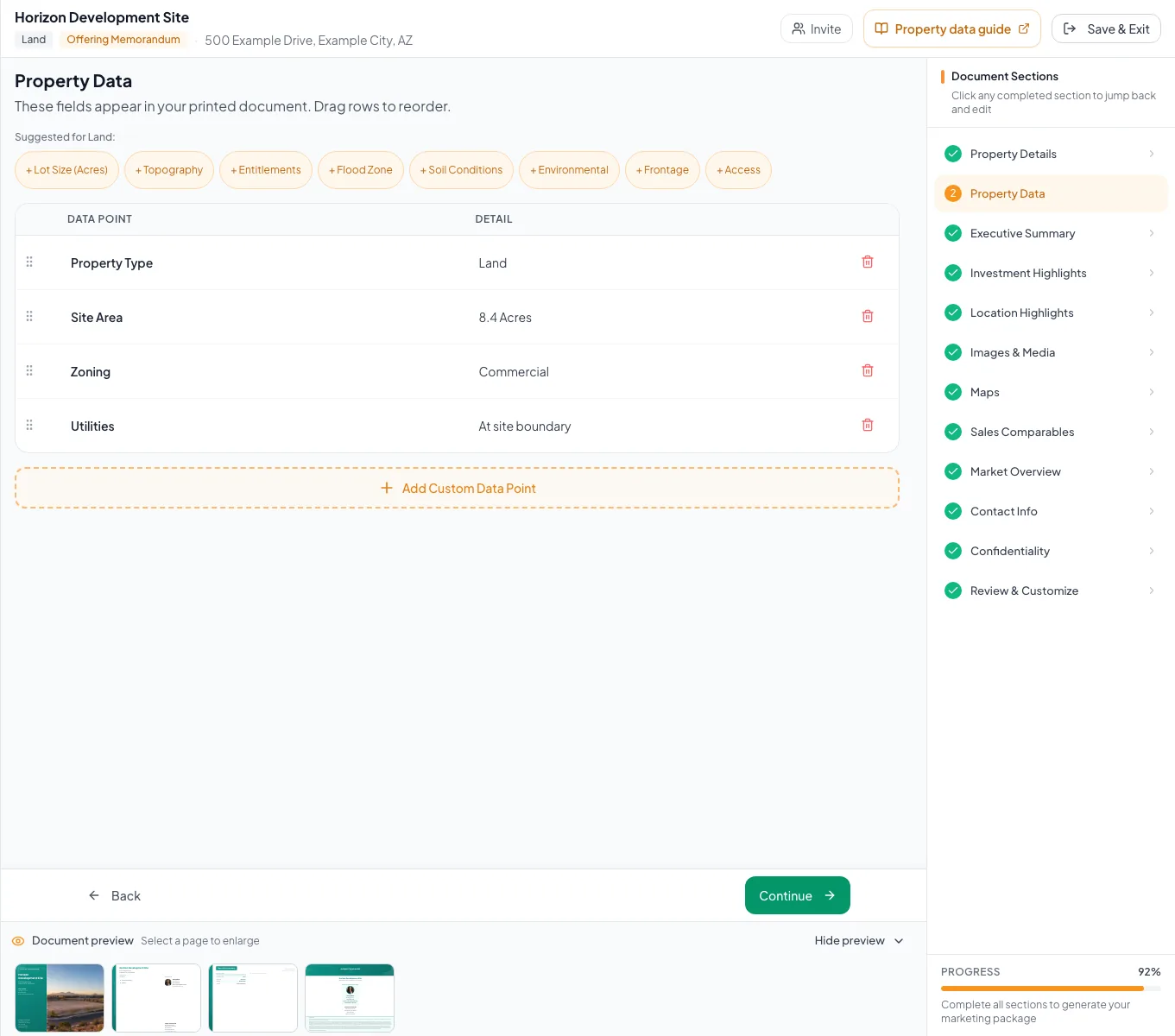
Review the populated land example and verify the units, property facts, and applicable model before preparing your own document. - 4
Build the parcel map
Maps
Configure the map for the subject parcel.
Expected result: The saved map shows the parcel context and access.
If this step does not work
Correct the subject pin before adding nearby demand generators.
- 5
Write the location highlights
Location Highlights
Enter the location highlights.
Expected result: The location story states source-backed access and nearby demand facts.
If this step does not work
Remove any unsupported proximity or travel-time claim.
- 6
Write the market overview
Market Overview
Enter the development and market context.
Expected result: The market narrative explains the opportunity without relying on rent-roll pages.
If this step does not work
Qualify proposed development and pending entitlement claims accurately.
- 7
Add sales evidence
Sales Comparables
Enter the available comparable facts.
Expected result: The document has source-backed Land sales evidence.
If this step does not work
The current generic comp modal lacks a new Lot Size input, so do not claim Price/Acre unless acreage is actually present.
- 8
Set the Land BOV range
BOV valuation > Sales comparison
For a Land BOV, enter the supported value range.
Expected result: The valuation section shows the source-backed range.
If this step does not work
If the document is not a BOV, skip this action.
- 9
Set the Land value opinion
BOV valuation > Opinion of value
For a Land BOV, enter the final value opinion.
Expected result: The Land BOV presents one conclusion that can be checked against the supported range.
If this step does not work
If the opinion falls outside the range, verify the evidence and document the reason before review.
- 10
Review output
Review & Customize
Verify acres, Price/Acre, Price/SF, parcel language, maps, and financial-page exclusions.
Expected result: The final document is internally consistent.
If this step does not work
Remove any unexpected native financial page before publishing, or contact support.
Resolve Land issues
Financial steps disappeared after conversion
Likely cause: Land intentionally hides the standard financial workflow.
- Confirm the target type is Land.
- Remember the records are preserved but hidden.
- Use a BOV if a Land valuation conclusion is required.
Price/Acre is blank
Likely cause: Acreage or asking price is missing.
- Enter acreage.
- Verify selling price.
- Review the calculated metric.
A new comparable cannot calculate Price/Acre
Likely cause: The current comparable form does not expose Lot Size for new entries.
- Do not infer acreage.
- Use other supported source facts.
- Contact support if Price/Acre is essential.
- Acreage entered
- Parcel facts sourced
- Zoning and entitlement status qualified
- Price/Acre checked
- Maps reviewed
- No unintended financial pages
Related guides
Build a multi-building or portfolio document
Package several buildings, parcels, or locations into one OM or teaser, with each property on the map and in the order buyers should see them.
Open guideComplete a BOV valuation and reconciliation
Build a Broker Opinion of Value that walks the owner from income and sales-comparison evidence to a clear low, midpoint, and high value.
Open guideVerify financial pages before publishing
Do a final pass on the financial pages before you send: the right pages, the right labels, and numbers that tie out.
Open guideYour next OM, done this afternoon
Turn your property facts, photos and financials into a polished, branded offering memorandum. Most brokers finish in 30 to 90 minutes.
No credit card required.