Outcome
You can identify the failing layer, preserve suppression and operation evidence, and choose a safe next action without bypassing controls.
Navigation path
Email Blasts or Settings > Status, audience, or Recent activity
Access
Included with any paid CREBuilder plan. Saved drafts and send history stay listed if a subscription lapses.
On this page
Before you start
Data, sources, and access to prepare
- The exact campaign subject, time, sender, method, and current visible status
- The original audience source and consent basis
Find the first thing blocking the send
Find the first failing layer
Start with the current state and move through setup, content, audience, capacity, review, and sending. Do not jump straight to resending.
Current history or setup status
Access, agreement, address, sender
Subject, HTML, links, signature
Validity, consent, suppression, cap
Daily, monthly, ramp, platform
Human review outcome
Sent, failed, or unconfirmed
- Current history or setup statusAccess, agreement, address, sender
- Access, agreement, address, senderSubject, HTML, links, signature
- Subject, HTML, links, signatureValidity, consent, suppression, cap
- Validity, consent, suppression, capDaily, monthly, ramp, platform
- Daily, monthly, ramp, platformHuman review outcome
- Human review outcomeSent, failed, or unconfirmed
- 1
Capture the current state
Email Blasts > Recent activity or Settings > Email & sending
Record subject, time, sender, method, status, reason, and any operation identifier shown.
Expected result: You have evidence before changing the draft or audience.
If this step does not work
If the status page failed, retry it. Do not infer missing setup, Failed, or Not sent from a network error.
- 2
Find the first failing gate
Setup, composer, or history detail
Check setup, content, audience, allowance, review, and sending in that order.
Expected result: One actionable blocking layer is identified.
If this step does not work
Change only what is blocking the send. A held campaign is released with the content it was submitted with.
- 3
Apply only the safe recovery
The identified gate
Use the matching resolution below.
Expected result: The blocker clears or support receives precise evidence after processing finishes.
If this step does not work
If status is Sending or Outcome unconfirmed, stop before any new submission.

Use the appropriate retry, correction, external delivery or support action.
Respect unsubscribe, bounce, and complaint suppression
Unsubscribe
- Why it exists
- The recipient asked not to receive company or applicable hosted outreach.
- Recovery rule
- Do not re-add or re-import. Use an authorized correction process only for proven error.
Hard bounce
- Why it exists
- The address produced a delivery failure and harms sender reputation if retried.
- Recovery rule
- Correct the underlying address with independent evidence before any authorized suppression review.
Complaint
- Why it exists
- The recipient or mailbox provider reported unwanted mail.
- Recovery rule
- Treat as protected and do not send through another source or alias.
Provider opt-out from CRM import
- Why it exists
- The source system reported a do-not-email state.
- Recovery rule
- The company suppression remains even after safe import undo.
- 1
Identify the protection type
Audience result, contact context, or support detail
Determine whether the address is unsubscribed, hard-bounced, complained, or imported as opted out.
Expected result: You know why the address was removed.
If this step does not work
Do not assume every removed recipient is merely invalid.
- 2
Remove it from the planned audience
Composer > Recipients
Leave the address off this campaign, including through another list or spelling.
Expected result: The campaign contains only allowed addresses.
If this step does not work
If all recipients are removed, stop. Rebuild from a genuinely permitted audience rather than replacing identities.
- 3
Escalate only a provable error
Documented support path
Provide evidence of a corrected address or incorrect suppression without asking to bypass consent.
Expected result: Support can review the exact protected record.
If this step does not work
Until corrected through the authorized path, treat the suppression as final.
Resolve setup, review, and capacity blocks
Setup, access, or agreement blocks sending
Likely cause: Company sending is not activated, access was declined or withdrawn, your email is not verified, or a newer agreement version is not accepted.
- Open Settings > Email & sending > Sender & setup.
- Follow the current state.
- Have a company manager accept updated terms or activate sending.
- Keep contact-email automations paused until ready.
The business address is incomplete
Likely cause: Street, city, state, or ZIP or postal code is missing.
- Update Settings > Company profile > Business mailing address, or the address fields in Set up sending.
- Save every required component.
- Reload readiness.
- Do not insert an address manually into one campaign as a substitute.
Daily, monthly, or ramp capacity is insufficient
Likely cause: The effective audience exceeds current displayed capacity.
- Use the displayed remaining values.
- Remove nonessential recipients when the message can remain coherent.
- Wait for the proper reset or ramp increase.
- Do not split sends merely to evade a limit.
Platform Mail is temporarily paused or your company is suspended
Likely cause: Sending is paused across CREBuilder Mail, or for your company to protect its sender reputation.
- Keep the draft unchanged.
- Follow the displayed support or wait guidance.
- Do not repeatedly retry or move the same audience to an unapproved path.
The campaign is In review
Likely cause: Clean-send runway, imported provenance, or account policy requires human review.
- Wait for approval or rejection.
- Do not duplicate the campaign.
- Check the In review filter in the hub for the outcome.
The campaign shows Not sent: review declined
Likely cause: Human review found a content, consent, provenance, or policy issue.
- Read the reason.
- Correct the underlying issue.
- Submit a new campaign only after the prior one is terminal and the correction is complete.
Handle failed, partial, and unconfirmed sends
Local preflight refusal
- Could messages already have gone out?
- No
- Action
- Correct the named gate and use a new operation only when the UI allows it.
Rejected review
- Could messages already have gone out?
- No
- Action
- Correct the review issue before a new submission.
Failed
- Could messages already have gone out?
- Use the reason and certainty reported.
- Action
- Do not guess. Retry only when the state explicitly establishes a safe new attempt.
Sent with a lower recorded sent count
- Could messages already have gone out?
- Yes, for at least some recipients
- Action
- Never resend to the full list. The row does not list which recipients failed, so contact support.
Sending
- Could messages already have gone out?
- Possibly
- Action
- Wait. Do not resend.
Outcome unconfirmed
- Could messages already have gone out?
- Possibly
- Action
- Do not resend. Preserve operation evidence for reconciliation or support.
- 1
Stop automatic retry behavior
Composer and browser
Do not refresh-submit, duplicate, or rebuild the audience while status is Sending or Outcome unconfirmed.
Expected result: No second send is created.
If this step does not work
If another teammate might send, notify them of the exact subject, time, and status.
- 2
Refresh the durable row
Email Blasts > Recent activity
Refresh history after a reasonable interval.
Expected result: The same operation displays its latest status.
If this step does not work
Remember the hub shows only the latest 50. Capture the row while investigating.
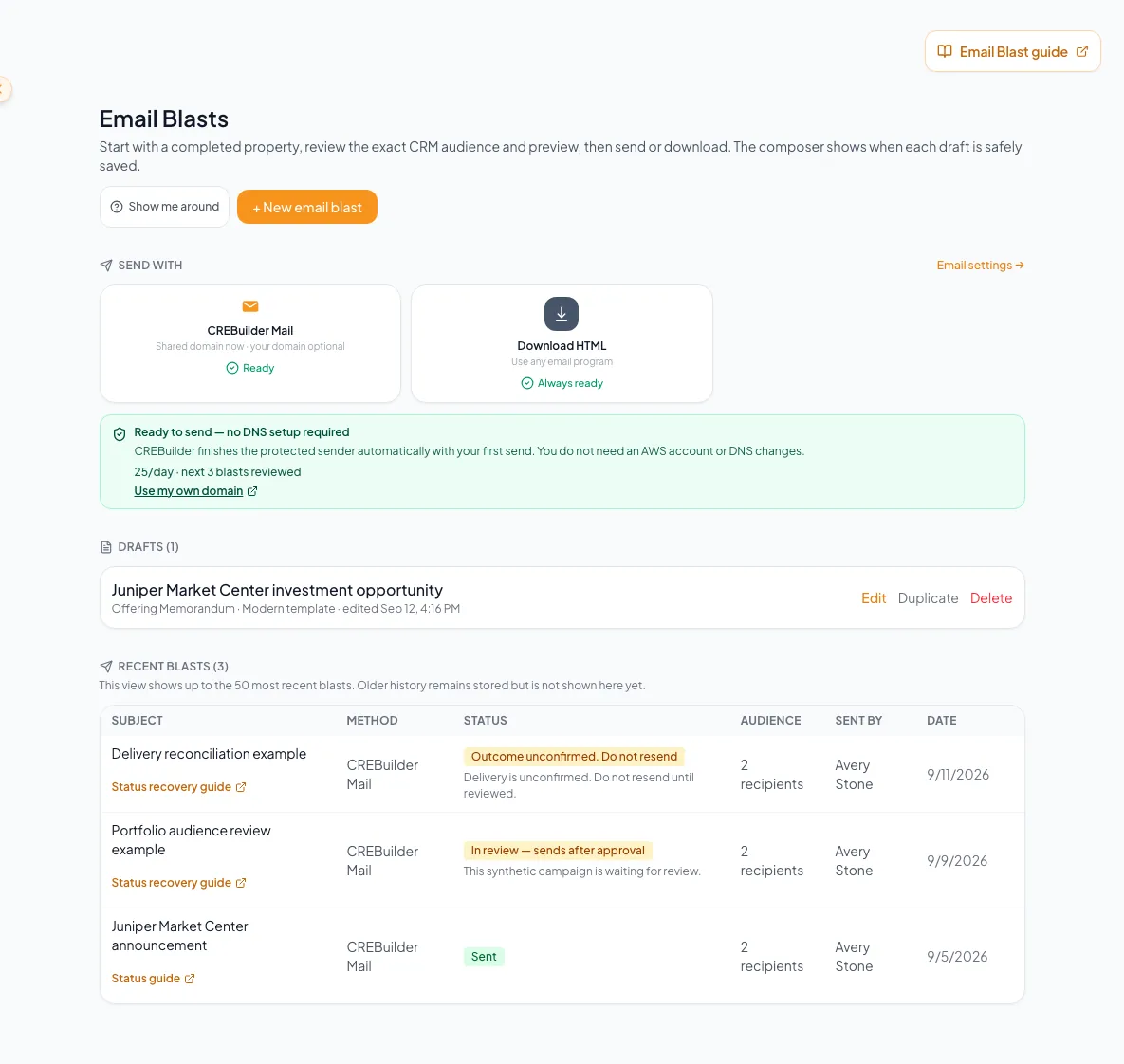
Diagnose access, domain, audience, allowance, duplicate-send, and delivery-state problems in a safe recovery order. - 3
Read the updated outcome
Email Blasts > Recent activity > campaign row
Review the updated status and reason.
Expected result: The operation either remains pending or has reached a terminal state.
If this step does not work
Do not resubmit when the outcome remains uncertain.
- 4
Escalate with evidence
Documented support channel
Provide company, sender, subject, timestamp, status, recipient count, method, screenshots, and operation identifier if shown.
Expected result: Support can investigate one exact operation without asking you to recreate it.
If this step does not work
Do not include recipient content or personal data beyond what support requests through the approved channel.
- 5
Escalate a possible partial result
Recent activity > Sent row
Send support the recorded accepted count, the audience count from preflight, and the reason shown.
Expected result: You have a documented discrepancy without assuming which recipients failed.
If this step does not work
The row does not list which recipients failed. A manual reconciliation can include previously unresolved rows in the recorded count. Preserve the row and contact support instead of guessing or resending.
Keep support and reporting claims accurate
Troubleshooting evidence
- Current setup or history status was loaded successfully.
- The exact subject, sender, time, method, and reason were captured.
- Audience source and consent basis are known.
- Suppressed addresses were not reintroduced.
- Displayed allowance and ramp values were recorded.
- Held, Scheduled, Sending, and Outcome unconfirmed states were not duplicated.
- Sent was not described as inbox delivery.
- No open or click analytics were claimed.
- A future send time was stated only for a row that shows Scheduled.
A stakeholder asks for open or click performance
Likely cause: CREBuilder does not currently expose those campaign analytics.
- Report only send status and accepted-attempt context.
- Do not reinterpret property metrics as email engagement.
- Use an approved external platform after Download HTML if that measurement is required.
A stakeholder expects a future send time
Likely cause: The campaign may be Scheduled, sent now, held, or only downloaded.
- Read the row: a Scheduled row shows its time; a Sent row shows acceptance; a Downloaded row shows file generation only.
- If externally scheduled after Download HTML, use that external platform as the source of truth.
Your next OM, done this afternoon
Turn your property facts, photos and financials into a polished, branded offering memorandum. Most brokers finish in 30 to 90 minutes.
No credit card required.