Outcome
Your campaign goes out once, to the right list, and you know right away whether it sent or is waiting for review.
Navigation path
Email Blasts > Composer > CREBuilder Mail > Send
Access
Included with any paid CREBuilder plan. Saved drafts and send history stay listed if a subscription lapses.
On this page
Before you start
Data, sources, and access to prepare
- A complete campaign design
- A consent-reviewed unique audience of 1 to 500
- Mail settings ready and enough displayed allowance
Confirm everything is ready to send
| Gate | What must be true |
|---|---|
| Paid sending access and readiness | The account has paid sending access and Mail readiness permits a new hosted send. |
| Subject and content | Subject is present and no more than 300 characters; links, images, source facts, and responsive preview were reviewed. |
| Audience | At least one and no more than 500 strict-valid unique addresses remain after suppressions are removed. |
| Mail access | Access is approved, current terms are accepted, and the company is not suspended. |
| Compliance address | Street, city, state, and ZIP/postal code are complete. |
| Platform and sender | CREBuilder Mail is available and your shared or verified sender is ready. |
| Allowance | Displayed daily, monthly, and any ramp-adjusted capacity covers the effective audience. |
| Review | The audience and account review policy is accepted, including any hold before sending. |
CREBuilder checks again when you send
At the moment you select Send, CREBuilder re-checks recipients, suppressions, Mail access, agreement, address, allowance, sender, and review policy, so a last-minute change cannot slip through.
Understand review and allowance behavior
New approved CRM sender
- Review behavior
- The first clean CRM campaigns normally go to human review; the screen shows how many remain.
- Allowance behavior
- Uses current displayed account limits.
Uploaded-classified audience
- Review behavior
- Every campaign is held for human review.
- Allowance behavior
- Uses half the displayed allowance.
Always-review account mode
- Review behavior
- Every campaign is held regardless of audience source.
- Allowance behavior
- Uses displayed account and ramp limits.
Verified new domain
- Review behavior
- Review policy still applies.
- Allowance behavior
- Daily capacity can start below the nominal cap and increase over the first weeks.
Platform capacity paused
- Review behavior
- Campaigns cannot send until the pause ends.
- Allowance behavior
- Wait for the displayed recovery rather than retrying around the pause.
What the screen should tell you
- Daily and monthly caps and remaining capacity
- Any lower ramp ceiling
- How many upcoming clean campaigns remain in review
- Whether the audience is treated as Uploaded
- Whether Mail is suspended, platform-paused, or unavailable
- Whether a held campaign is waiting for a human decision
Go by the limits on screen
Account overrides, warm-up, recipient provenance, and current platform capacity can change the usable amount. Do not rely on a hard-coded allowance from an older guide.
Submit once and interpret the immediate result
- 1
Run the final content preview
Composer > Desktop, Mobile, and full preview
Read subject, message, every property, image, metric, link, broker identity, signature expectation, and footer context.
Expected result: The final rendered message is accurate at desktop and mobile widths.
If this step does not work
Correct the draft and wait for autosave before continuing.
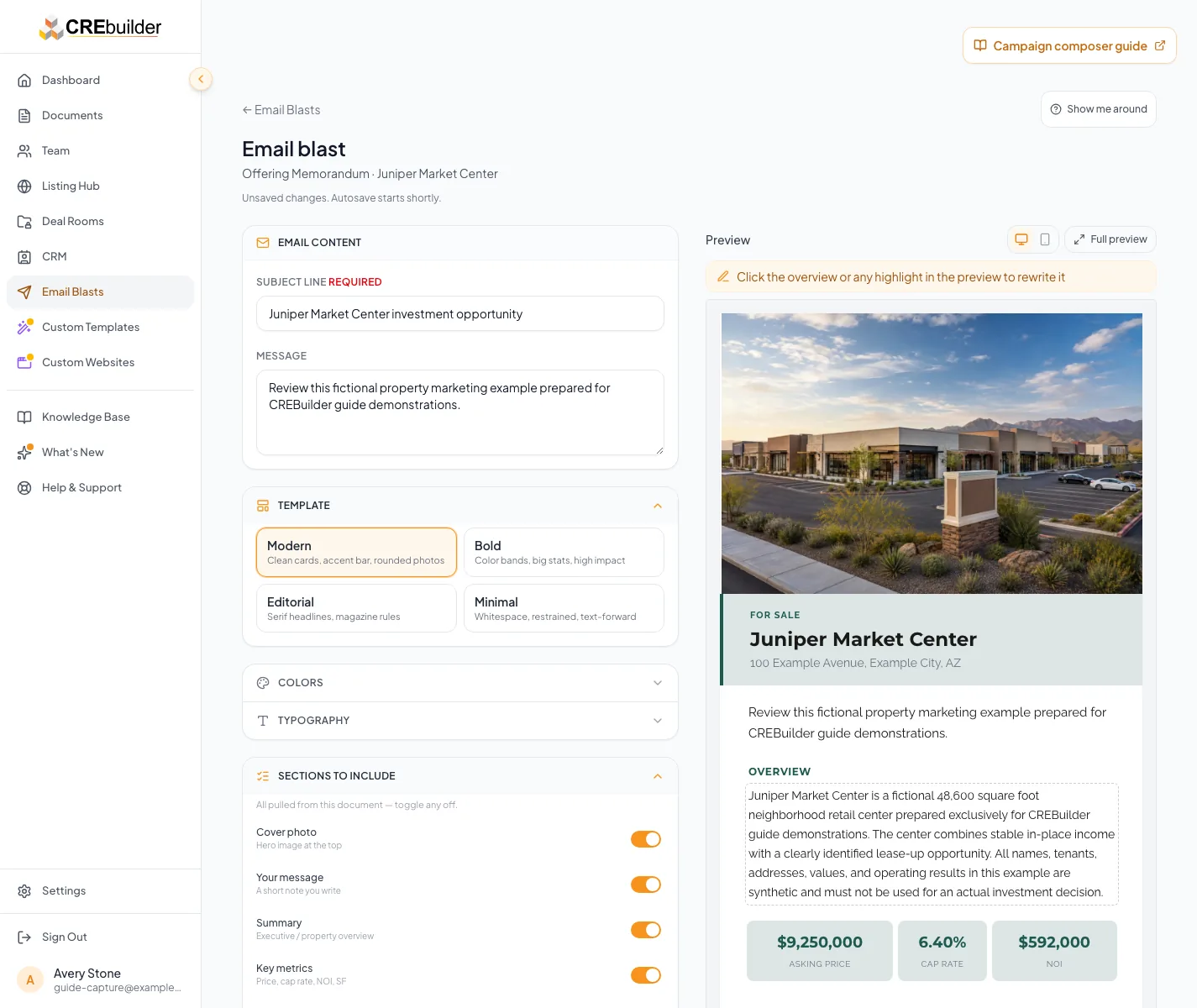
Inspect the full preview, then review the displayed recipient count, allowance, and sending readiness. The server performs its final checks when you submit. - 2
Run the final audience review
Composer > Recipients summary
Confirm source classification, unique count, invalid count, suppression expectations, consent, review path, and allowance impact.
Expected result: The audience is permitted, strict-valid, no more than 500, and understood.
If this step does not work
Remove uncertain or invalid recipients. Re-import any file that disappeared after reload.
- 3
Review Mail state
Composer > Send with CREBuilder Mail
Confirm approval, current agreement, complete address, effective sender, no suspension or platform pause, and enough displayed allowance.
Expected result: The Send action reflects a current ready state.
If this step does not work
If capability is unknown, retry status. Keep the draft and do not submit until the check succeeds.
- 4
Submit exactly once
Composer > Send
Select Send one time.
Expected result: The Send button locks while the campaign submits, so an extra click cannot send a second copy.
If this step does not work
Keep the composer open until the result appears. If your browser blocks site storage, the send stops before anything goes out; allow storage and retry only when the app says nothing was sent.
- 5
Read the returned outcome
Composer result or Email Blasts hub
Treat Sent, In review, Rejected, Failed, Sending, or Outcome unconfirmed according to the status guidance.
Expected result: The status tells you the next step.
If this step does not work
Held is not sent. Sending or Outcome unconfirmed may already have started sending, so do not create a duplicate send.
One send, one result
Extra clicks and retries resolve to the same send instead of creating a duplicate.
One Send action
One tracked send
Preflight and review gates
Terminal sent, rejected, failed, or held state
Sending or outcome unconfirmed
- One Send actionOne tracked send
- One tracked sendPreflight and review gates
- Preflight and review gatesTerminal sent, rejected, failed, or held state
- Preflight and review gatesSending or outcome unconfirmed
Know what CREBuilder appends and what Sent means
| Behavior | Meaning |
|---|---|
| Separate messages | CREBuilder submits a separate hosted message to each recipient, so no one sees the rest of the list. Suppression and later provider outcomes can reduce what is accepted or delivered. |
| Compliance footer | CREBuilder appends the complete company physical address and a personalized unsubscribe link at send time. |
| Signature | An enabled per-user sanitized signature is appended by hosted composition. |
| CSS inlining | Styles are prepared for email-client compatibility at the send boundary. |
| Sent status | The provider accepted or CREBuilder recorded the send attempts. It does not guarantee inbox placement or reading. |
| Analytics | No open or click analytics are exposed. Property metrics in the composer are listing facts, not engagement metrics. |
| Scheduling | There is no in-app hosted campaign scheduling. |
The campaign is held for review
Likely cause: The account is in its clean-send runway, the audience is Uploaded, or the account uses always-review mode.
- Return to the hub.
- Wait for approval or rejection notification.
- Do not submit another copy.
- Review usually completes within the time described by the current UI.
Preflight removed some recipients
Likely cause: The final suppression check found unsubscribes, hard bounces, or complaints.
- Accept the reduced final audience.
- Do not re-add protected addresses.
- If none remain, stop and rebuild only from permitted contacts.
The immediate outcome is unconfirmed
Likely cause: CREBuilder could not yet confirm whether the messages went out.
- Open Recent blasts and retain the operation context.
- Do not resend.
- Wait for reconciliation or contact support with subject, time, sender, and status.
Final verification
- Composer > Recipients summary: The audience is permitted, strict-valid, no more than 500, and understood.
- Composer > Send with CREBuilder Mail: The Send action reflects a current ready state.
- Composer > Send: The Send button locks while the campaign submits, so an extra click cannot send a second copy.
- Composer result or Email Blasts hub: The status tells you the next step.
- No blocking warning, failed status, or unresolved validation message remains in the completed workflow.
Your next OM, done this afternoon
Turn your property facts, photos and financials into a polished, branded offering memorandum. Most brokers finish in 30 to 90 minutes.
No credit card required.