Outcome
You will clear pending requests quickly, read buyer engagement accurately, and give every serious prospect a next step in CRM.
Navigation path
Deal Rooms > Open room > Prospects and Activity
Access
Prospect names and per-person activity need Email Required or an NDA access level. Approving, declining, and revoking need edit access to the room.
On this page
What you will accomplish
Two kinds of NDA requests
Pending requests and Prospects handle single-signer NDAs. Buyer groups with multiple signers are tracked in Multi-party NDAs; see Track multiple signers and release the files further down.
Prospect review loop
Use access and engagement together to decide the next step.
Verified identity
Gate or NDA result
Your approval decision
Views and downloads
CRM next step
- Verified identityGate or NDA result
- Gate or NDA resultYour approval decision
- Your approval decisionViews and downloads
- Views and downloadsCRM next step
Before you start
Data, sources, and access to prepare
- A Deal Room with Email Required or an NDA access level
- Your approval criteria
- At least one visitor or test visit
Prepare these details
- Decide who qualifies for access
- Know the statuses: Pending, Active, Declined, Revoked, Expired
- Decide which activity deserves a CRM task or deal
Complete the task
- 1
Open the prospect list
Room > Prospects
Select Prospects.
Expected result: Identified visitors appear with their access type, engagement, and status.
If this step does not work
If the list is empty and says Anonymous access is active, switch the Access gate to Email Required or an NDA level.
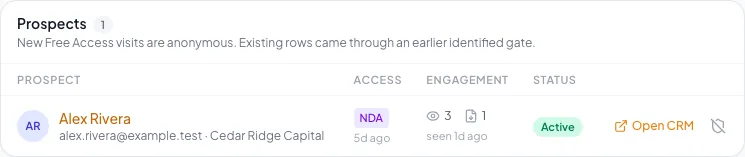
Review prospect requests and activity, make access decisions, and preserve a clear record of each approval. - 2
Inspect one identity
Prospect row
Review the prospect’s name, email, and qualification answers.
Expected result: You can see who they are, how they got in, and how engaged they are.
If this step does not work
Compare the email with CRM before assuming a similar name is the same person.
- 3
Review the signed NDA
Room > Pending requests > Download signed NDA
Download the signed NDA.
Expected result: The executed NDA includes a signature certificate. A pending request can already have a completed signature.
If this step does not work
For older PDFs without placed fields, the signature appears only on the certificate page.
- 4
Approve one pending request
Pending request
Select Approve.
Expected result: The status changes to Active and the buyer gets their unlock link by email.
If this step does not work
Select Decline instead if the request does not qualify.
- 5
Decline one pending request
Pending request
Select Decline.
Expected result: After you confirm Decline, the status changes to Declined and the visitor is notified by email. Their signed NDA stays on file.
If this step does not work
Close the dialog to keep the request pending.
- 6
Revoke existing access
Prospect row
Select Revoke access.
Expected result: After you confirm Revoke, the prospect immediately loses access to the OM and all room files.
If this step does not work
Files already downloaded remain covered by the signed NDA.
- 7
Review one activity event
Room > Activity
Read an activity row.
Expected result: You see who viewed the deal room, viewed the OM, downloaded the OM PDF, or downloaded a file, and when.
If this step does not work
Treat an OM view and a file download as different signals.
- 8
Create the next action
Prospect row > Open CRM
Add a task, note, requirement, or deal on the contact.
Expected result: The contact timeline has an owned next step.
If this step does not work
Use a note rather than a deal while the buyer is still early.
Track multiple signers and release the files
Every buyer group’s NDA shows its status in Room > Multi-party NDAs. One person’s Signed doesn’t mean everyone has signed, or that you approved access. Once access goes out, each signer with file access also appears in Prospects, where you can revoke one person without voiding the whole NDA.
Awaiting recipient confirmation
- What it means
- The buyer’s details are in. No invitations are out and nobody has access.
- What to do
- Check the PDF, signers, and wording, then send
Waiting for signatures (1/3)
- What it means
- Some included signers haven’t finished. The count shows who has.
- What to do
- Check each signer; with One at a time, later roles wait their turn
Preparing executed PDF
- What it means
- Everyone signed and the final PDF is being built
- What to do
- Wait a moment; files stay locked
Awaiting access approval
- What it means
- The executed PDF is ready and needs your decision
- What to do
- Read the executed NDA, then approve or reject
Completed, access approved
- What it means
- Everyone signed, the PDF is ready, and access is approved
- What to do
- Eligible signers get their own access links while the room and listing stay available
Signer declined, replacement required
- What it means
- An included signer declined, so this NDA can’t finish
- What to do
- Void it and send a replacement
Access rejected or Voided
- What it means
- This NDA will never open the files
- What to do
- Keep it for the record; start a replacement if needed
- 1
Check each signer
Room > Multi-party NDAs > buyer row
Select the buyer group’s row.
Expected result: Each signer shows Awaiting signature, Viewed, Signed, or Declined, plus invitation and executed-copy email status.
If this step does not work
Viewed is not Signed, and an email marked sent is not proof it reached the inbox.
- 2
Read the executed NDA
Request > Download executed NDA
Select Download executed NDA.
Expected result: The PDF has every signature plus the signature certificate at the end.
If this step does not work
The button appears once Preparing executed PDF finishes.
- 3
Approve file access
Request > Approve materials access
Select Approve materials access.
Expected result: Each signer you marked for file access gets their own access link by email.
If this step does not work
The button stays off until everyone signs and the executed PDF is ready. With NDA – Auto Access there is no approval step; access goes out on its own once both are done.
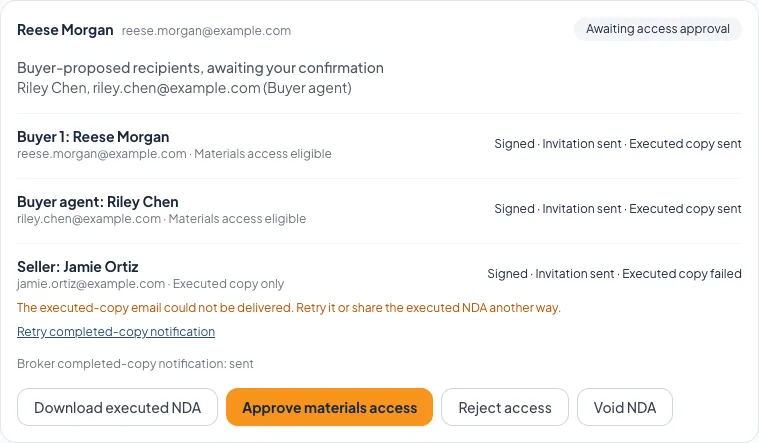
Once everyone signs and the executed PDF is ready, review it and approve file access for the buyer side. - 4
Reject file access
Request > Reject access
Select Reject access for a buyer group that doesn’t qualify.
Expected result: After you confirm, the status changes to Access rejected and no files open.
If this step does not work
Close the confirmation to keep the request pending. Signatures stay on record either way.
- 5
Resend an invitation
Unsigned signer > Resend invitation
Select Resend invitation for the signer who needs a new link.
Expected result: A fresh invitation goes out and their previous link stops working.
If this step does not work
Wait a minute between resends. With One at a time, only the signer whose turn it is can be resent.
- 6
Retry an executed-copy email
Signer > Retry completed-copy notification
Select Retry completed-copy notification.
Expected result: The same executed NDA link is sent again. Signatures don’t change.
If this step does not work
If the first email may have arrived, a confirmation asks before sending another. If the link has expired, download the executed NDA from the room instead.
Check access separately from signing
- Every included signer shows Signed
- The executed NDA downloads and reads correctly
- Your approval matches the room’s access level
- Only the intended signers are marked for file access
- The seller and other copy-only signers have no file access
- Buyers open files with their own access link, not their signing link
Void and replace a sent NDA
Once an NDA is sent, you can’t edit its signers, PDF, or wording. To change any of them, or to restart after someone declines, void it and send a replacement.
- 1
Void the sent request
Request > Void NDA
Select Void NDA.
Expected result: A confirmation explains that signing links and file access will be revoked and past signatures kept.
If this step does not work
Check you have the right buyer group before confirming.
- 2
Confirm the void
Void NDA confirmation
Confirm the void.
Expected result: The request shows Voided. Its signing links and any file access stop working.
If this step does not work
Refresh the room after a connection error before trying again.
- 3
Create the linked replacement
Voided request > Create replacement request
Select Create replacement request.
Expected result: A new request appears as Awaiting recipient confirmation, marked as the replacement for the original.
If this step does not work
The room needs an NDA access gate and multiple-signer NDAs turned on to create it.
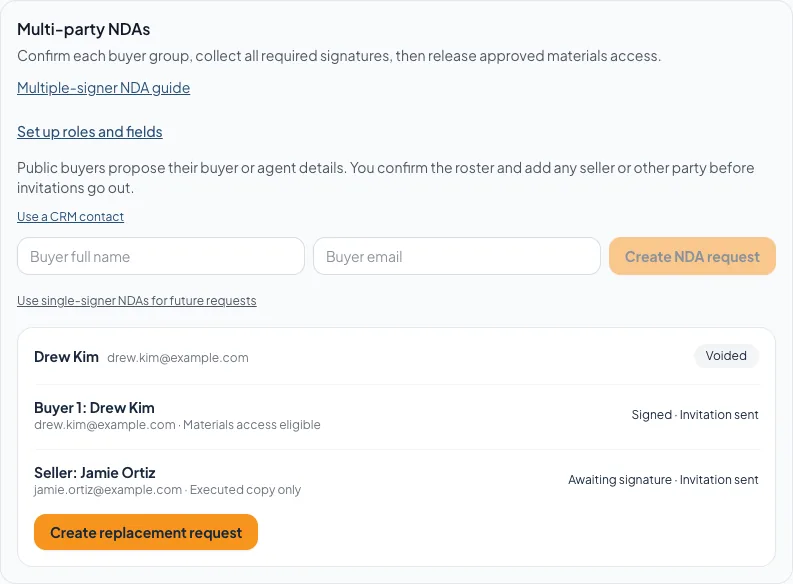
A voided NDA keeps its history and offers a replacement request for fresh signatures. - 4
Review the replacement roster
Replacement request > role cards
Check every included role and signer.
Expected result: The corrected signers are ready to sign fresh.
If this step does not work
No prior signature is copied into the replacement. Everyone included signs again.
- 5
Send after fresh review
Replacement request > Confirm recipients and send NDA
Send the replacement with the confirmation button.
Expected result: New invitations go out for the replacement NDA.
If this step does not work
Fix any message shown before sending. Later changes need another void and replacement.
What a void does and doesn’t do
Void NDA stops future signing and file access for that request. It doesn’t erase signatures already given or pull back files already downloaded. You can still download the executed NDA from a voided request.
Activity interpretation
Verified email
- What it tells you
- The buyer controls that email address
- What to confirm in conversation
- Capacity and intent
Signed NDA
- What it tells you
- The buyer signed your agreement
- What to confirm in conversation
- Approval, when you use NDA – Approval Required
OM view
- What it tells you
- The buyer opened the OM
- What to confirm in conversation
- Which sections mattered
File download
- What it tells you
- The buyer downloaded that file
- What to confirm in conversation
- Whether they have reviewed it
Approved access
- What it tells you
- You unlocked the files
- What to confirm in conversation
- Your next follow-up
NDA requests also wait in CRM > Leads alongside your other inquiries. Both places act on the same request, so a decision made in one shows in the other.
Troubleshooting and next steps
Approve is missing.
Likely cause: The room uses NDA – Auto Access, the request is no longer pending, or you do not have edit access.
- Check the Access gate.
- Refresh the room.
- Ask the room owner to review the request.
Activity has no person attached.
Likely cause: Free Access visits are anonymous.
- Switch to Email Required or an NDA level for per-person tracking.
- Avoid matching anonymous activity to a guessed contact.
Final verification
- Every pending request has a decision
- If you declined or revoked access, it was the right person
- Activity is read by event type
- The CRM contact matches the room prospect
- Serious buyers have an owner and due date for the next step
- For multiple signers, every signer shows Signed and you read the executed NDA before approving
- No blocking warning, failed status, or unresolved validation message remains in the completed workflow.
Your next OM, done this afternoon
Turn your property facts, photos and financials into a polished, branded offering memorandum. Most brokers finish in 30 to 90 minutes.
No credit card required.